Bottleneck analysis settings
Overview
The bottleneck algorithm calculates a weighted score using three measures: average throughput time, affected cases, and average throughput time share. Create, view, edit, delete, or load weight configurations here. Only the process owner can change these settings.
Features
The configuration list shows all saved weight configurations.
Manage configurations

❶ The top of the page shows the active weight configuration and its type. If none is selected, the system preset (30%, 30%, 40%) is used.
❷ The table shows each configuration's name, measure weights, type (System preset or Custom), and usage status.
❸ Click Add configuration to create a custom configuration. The three weights must total 100%.
❹ Load the configuration you want to use.
❺ Edit a configuration, including the active one. Select Save and apply to use the updated configuration immediately.
❻ Delete configurations. Active configurations and system presets cannot be deleted.
❼ Delete all checked configurations. Active configurations and system presets cannot be selected.
Common controls
Filters
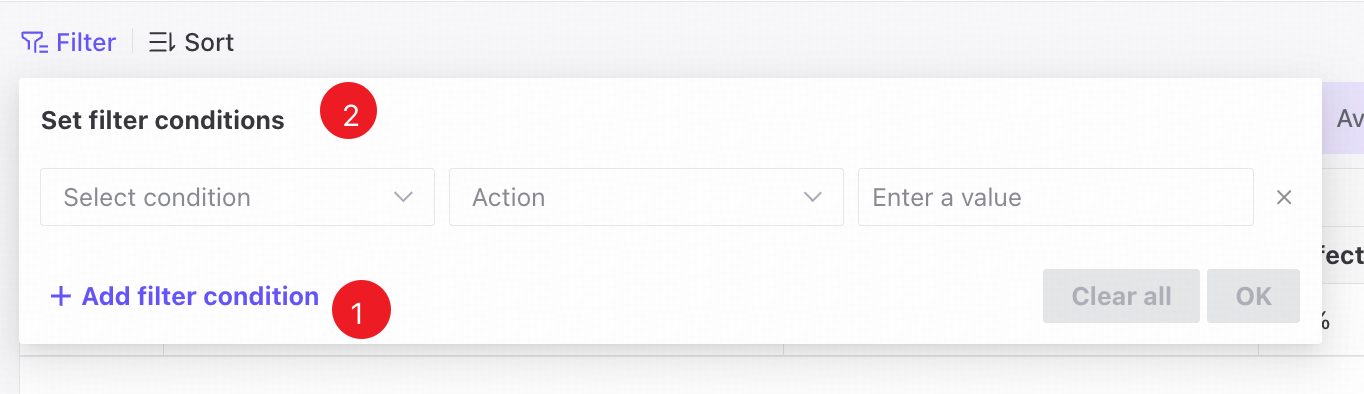
❶ Combine filter condition groups using Match all.
❷ Filter lists using their available columns.
Sorting and pagination
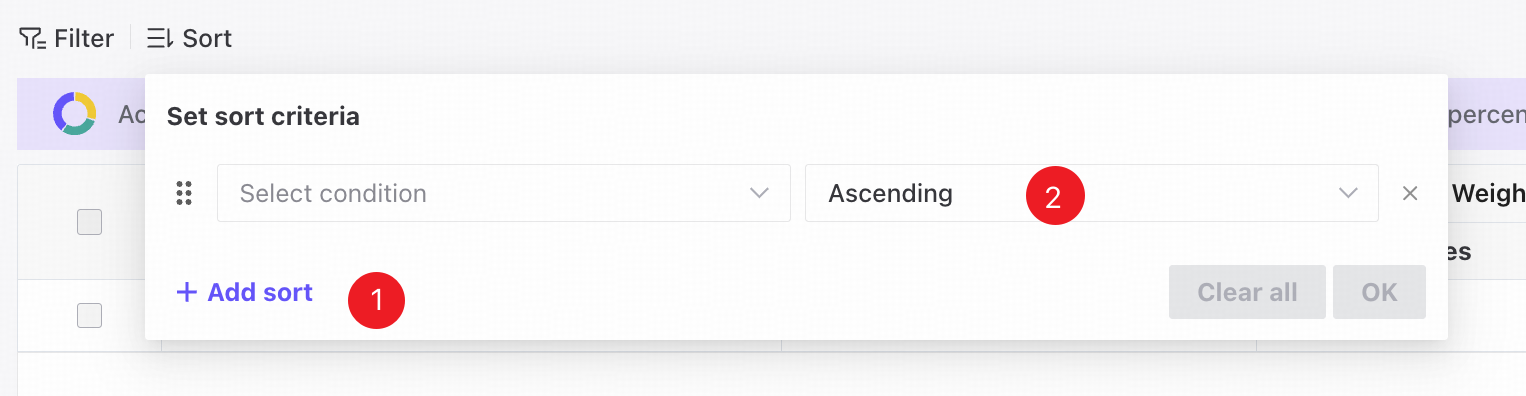
❶ Drag the handle up or down to reorder sorting conditions.
❷ Sort configurations in ascending or descending order.
❸ Set the number of entries displayed per page.