Build a model from scratch
Manual modeling
Use manual modeling from scratch when standard OCEL data is not directly available.
Import CSV source data and define Object and Event types in the system. Configure object-object and object-event relationships according to your business logic to map separate records into a multidimensional event log. This converts flat data into a standard OCEL model for in-depth process mining and analysis, making model creation more accessible.
Create a process analysis
Name the analysis, select a workspace, and choose a model creation method.
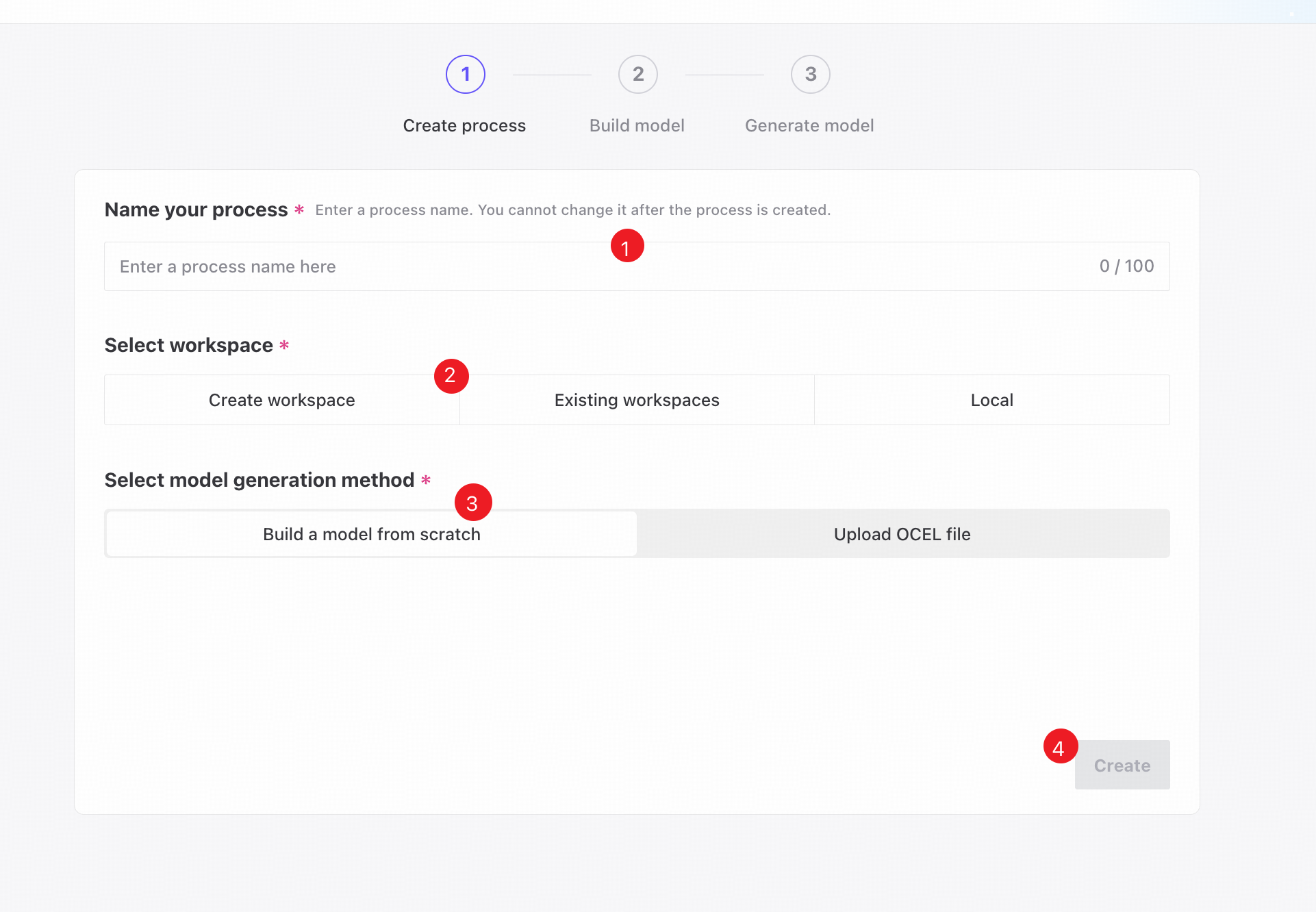
❶ Enter a unique process name. It cannot be changed after creation.
❷ Create a workspace, select an existing workspace, or save locally.
❸ Choose Build a model from scratch as the model generation method.
❹ Click Create to create the process.
Build the model
File upload
Uploading CSV files is the foundation of manual modeling. Use them to define initial Object and Event types, then extract data from their contents.
Upload CSV files containing business metadata to map instance types and activity records. Their columns define model dimensions and determine the scope and quality of extraction. The system parses attribute information so you can configure relationships between objects and between objects and events.
During modeling, use File management to upload, replace, or delete files.
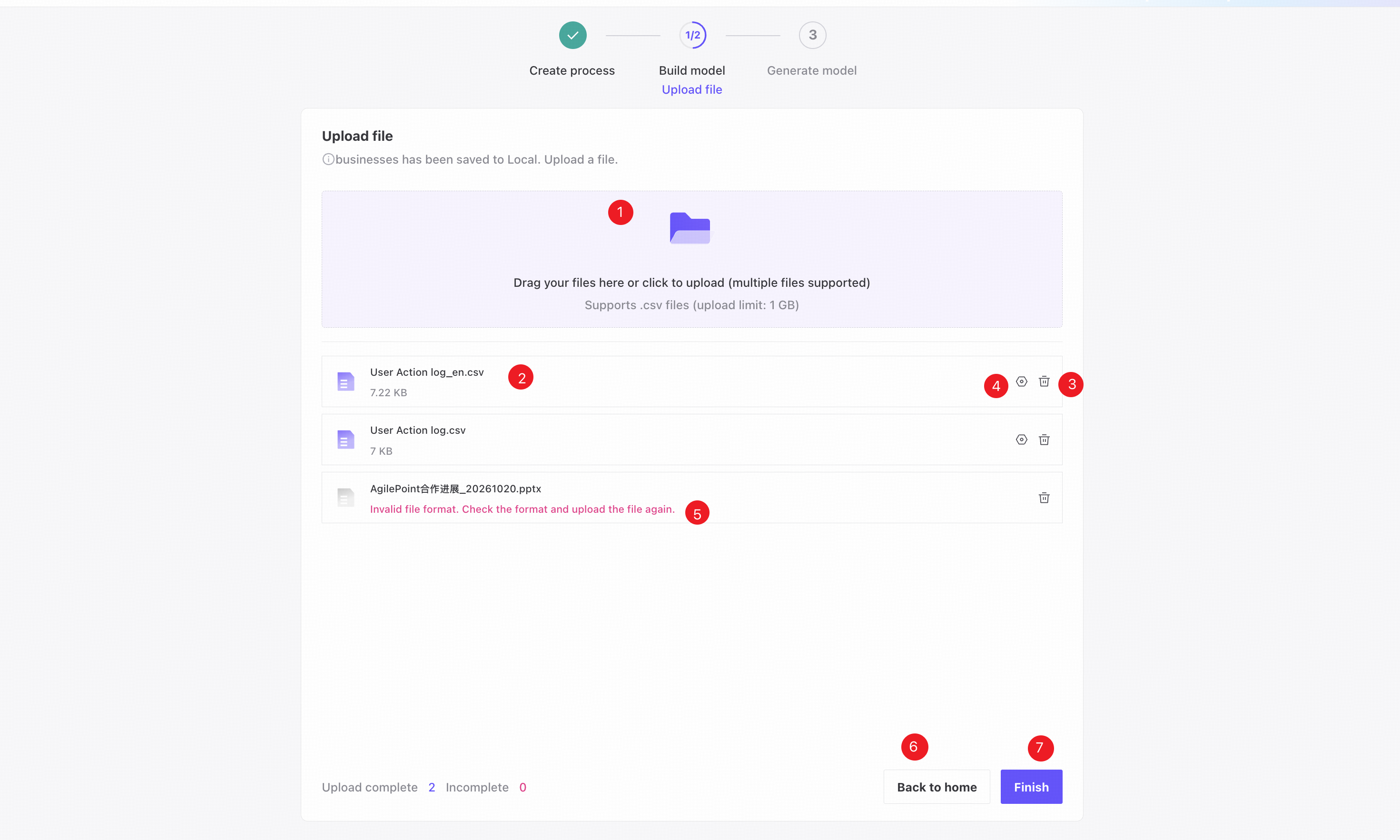
❶ Drag and drop or select CSV files. Multiple files can be uploaded at once, with a maximum of 100 files in total.
❷ The file list shows uploading, successfully uploaded, and failed files.
❸ Delete a file.
❹ Open a dialog to change the CSV delimiter and column data types.
❺ Invalid file indicator. Invalid files are excluded from model building when you click Finish.
❻ Return to the system home page.
❼ Click Finish to open model configuration.
File management
File management provides a central place to manage modeling data. View uploaded sources in the File list, configure CSV delimiters, and check or adjust column data types to match the model. Replace or delete files as business requirements or data change, without rebuilding the modeling logic. Managing sources throughout their lifecycle improves reuse and model maintenance.
For instructions, see File management.
Define object instances
Object definition establishes the business types involved in the process. Use uploaded CSV data to identify key objects, such as orders, parts, or resources. Name each object type and specify an ID column that uniquely identifies its instances. This turns separate business records into instance models with attributes and lifecycles, providing the basis for multidimensional relationships.
For instructions, see Object definition.
Event definition
Event definition describes activities and their states in a process. Use CSV data to define activity nodes, such as creation, approval, or shipment, and specify their event types and timestamp columns. Standardized event definitions convert business records into traceable event logs and form the dynamic behavior component of the OCEL model.
For instructions, see Event definition.
Object-Object relationships
Define hierarchies or associations between object types, such as orders and products or contracts and suppliers, by mapping related columns. These logical links represent complex instance dependencies as a graph, moving beyond a single process perspective. Accurate relationships let the generated OCEL model capture interactions across instances and reveal the overall business process structure.
For instructions, see Object-Object relationships.
Object-Event relationships
Specify which objects each event involves. For example, an Approval event may relate to Contract and Approver objects. Mapping events to objects links dynamic activities to the relevant instances. These many-to-many relationships allow one event to affect multiple objects and represent real business interactions, supporting a high-quality OCEL model with multiple perspectives.
For instructions, see Object-Event relationships.
Data extraction
After defining objects, events, and their relationships, extract, clean, and transform matching records from the uploaded CSV files using the configured mappings. Extraction populates the model with business data, synchronizes attribute columns, and instantiates relationships. It ensures model completeness and provides a reliable basis for process overviews and analysis.
For instructions, see Data extraction.